Maven deploy sources
Posted in
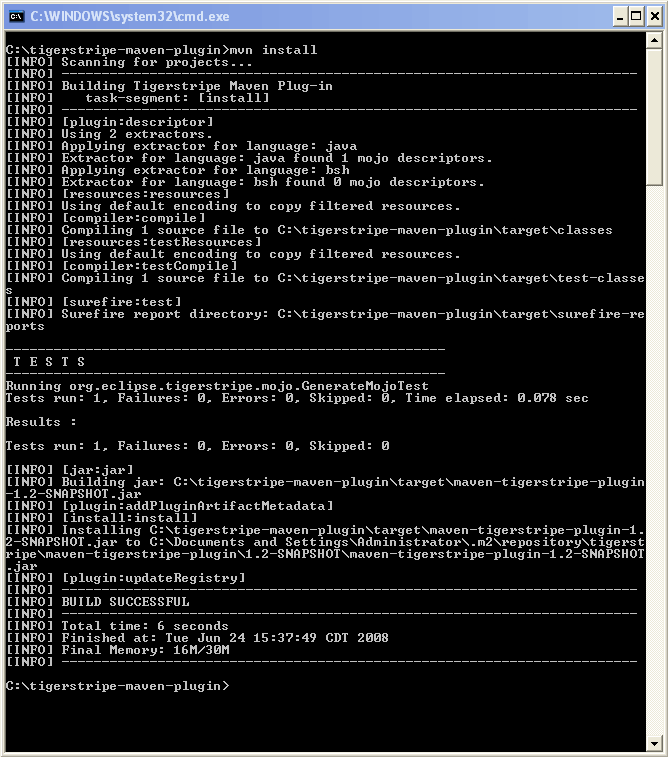
Today, I needed to deploy a 3rd party JAR file to our internal Nexus repository. The 3rd party JAR file was build from source, so I wanted to include the sources as well in our repo. I found out you can easily do this with -DperformRelease=true:
C:\Documents and Settings\jhbcrd6\Desktop\ejb3unit>mvn deploy -DperformRelease=true
...
[INFO] [deploy:deploy]
Uploading: 8< ... >8 ejb3unit-2.0.0-ctp.jar
15412K uploaded  (ejb3unit-2.0.0-ctp.jar)
...
[INFO] Uploading repository metadata for: 'artifact com.bm:ejb3unit'
[INFO] Uploading project information for ejb3unit 2.0.0-ctp
Uploading: 8< ... >8 ejb3unit-2.0.0-ctp-sources.jar
368K uploaded  (ejb3unit-2.0.0-ctp-sources.jar)
Uploading: 8< ... >8 ejb3unit-2.0.0-ctp-javadoc.jar
1798K uploaded  (ejb3unit-2.0.0-ctp-javadoc.jar)
Drupal comment_notify logger improved
Posted in

Christophe told me it wasn't possible to receive notification mails on comments you posted on my website. He was right, because I had a problem with permissions.
But after configuring the permissions, Christophe was still complaining ;-)!
After some research, I noticed something weird to the logger of Drupal:
Type	        Date                    Message	        User	Operations
...
comment_notify	02/15/2010 - 20:53	Notified: 	Jochus	source comment
In the PHP code, I found this piece of code:
      watchdog(
        'comment_notify',
        'Notified: '. !user_mail,
        array('!user_mail' => $user_mail),
        WATCHDOG_NOTICE,
        l(t('source comment'), 'node/'. $nid, array(
          'fragment' => 'comment-'. $alert->cid,
        ))
      );
So, normally, the subject should be: Notified: $HERE_COMES_THE_EMAIL_ADDRESS. But I noticed this was a typo in the logger. The correct implementation is:
      watchdog(
        'comment_notify',
        'Notified: '. $user_mail,
        array('!user_mail' => $user_mail),
        WATCHDOG_NOTICE,
        l(t('source comment'), 'node/'. $nid, array(
          'fragment' => 'comment-'. $alert->cid,
        ))
      );
While debugging the code, every mail was received correctly. So it seems to be working "sometimes" ... I haven't figured out what's going wrong here.
The first argument should be an array in user.module on line 502
Posted in

When a user was trying to register, he was getting the following error:
warning: array_keys() [function.array-keys]: The first argument should be an array in user.module on line 502.
user warning: You have an error in your SQL syntax; check the manual that corresponds to your MySQL server version for the right syntax to use near ')' at line 1 query: SELECT p.perm FROM msn_role r INNER JOIN msn_permission p ON p.rid = r.rid WHERE r.rid IN () in user.module on line 502.
In the end, the user was registered. But it was very confusing :-).
It seems to be a bug in Drupal 6.1x. I found the solution here: http://drupal.org/node/642126.
Go to: $SITE_HOME/modules/user/user.module and change line 502:
if (!isset($perm[$account->uid])) {
... into ...
You were receiving that error because $account->roles is empty and you cannot perform a SQL query with IN ()
Orjan Nilsen - So Long Radio (Original Mix)
Posted in
Arghhhh !!! Zo aanstekelijk! Al uw schuld Ruben ;-) !!!
Dash Berlin - Mike Foyle Pres Statica
Posted in
Beiden gehoord op de "In State of Trance" podcast van Armin Van Buuren. Vooral de 2e track is zaaaaaligggg! ;-) ! Het stukje van 02:45 tot 03:10 is super! Opbouwen naar de climax eh! ;-)
Toppunt van vriendelijk zijn ...
Posted in
 Deze avond was ik op weg naar huis en ik moest (voor degene die Aalter een beetje kennen) van de Corneliusparking naar 't Plein Van Heede rijden om in de ondergrondse parking te rijden. 't Gaat daar dus een beetje naar boven en 'k zag dat er nen BMW 335i coupé aan't sukkelen was om naar boven te rijden. Door de achterwielaandrijving (en de samengeperste sneeuw die ijs geworden was) slipte hij telkens door. 'k Heb hem dan geholpen met wat te duwen en we hebben hem dan uiteindelijk boven gekregen. De persoon in kwestie bedankte mij vriendelijk en reed daarna door. 't Probleem was dat mijne Astra (voorwielaandrijving) niet écht veel beter was ... :-S ... ik geraakt namelijk ook niet boven :-/. Helaas had ik geen behulpzame chauffeur die mij uit de nood kon helpen :-D. Met nen ferme aanloop ben ik na 10min sukkelen toch boven geraakt.
Man man, ik hoop dat er tegen morgenochtend toch wat gestrooid is want het zou morgenochtend wel eens ferm druk kunnen zijn naar Aalst ... Toch maar wat vroeger opstaan ;-) !

Ice karting @ FKI Machelen (Welcome championship) [ part 2 ]
Nog wat leuke filmpjes van gisteren !!!
EASEUS Partition Master Home Edition
 Today, I needed to resize/shrink my Windows partition (on my laptop of work) so I had some (free) allocated space to be able to install Ubuntu next to it. Reason why can be found here ;-) !
I mostly use Partition Magic for doing these kinds of operations. But today, it went wrong. I wasn't able to open the partition table. I was receiving the error: 117 Partition's drive letter cannot be identified. However, I was perfectly able to boot my Windows XP system. Yeah, can't explain why? That's why we have Windows? :p
So I tried shrinking with gparted, a Linux program which is included in the Ubuntu Live CD. But nevertheless, gparted was not able to open the partition table. I did some research and I noticed the helpdesk of my company didn't create my primary partition very well :-/. The partition was really-in-the-middle of my HDD. I don't know why/how/... but it was pretty much fucked up :-). So normally, you just remove the partition and start over again. But the people of the helpdesk worked 2 hours on my laptop, so I didn't want to spend 2 hours waiting for a second remastering process.
After Googling, I noticed a blog post which told me I had to use EASEUS Partition Master Home Edition (http://www.partition-tool.com/personal.htm). It looks really similar to PM, BUT, it's totally FREE :-).
I installed and tested the program, and the Partition Master was able to read my partition table from the MBR. I could then move the primary (NTFS) partition to the head of the cylinder block. This was done without loosing data! After applying changes (and writing the new partition table to the MBR), I was able to shrink the NTFS partition and install Ubuntu.
So go go EASEUS Partition Master Home Edition ! It's worth a try!