Taylor and Close - Cafe del Mar (2010 remix)
Posted in
Spotted @ DJ Tiësto's Club Life - podcast 167!
Great memories! ^^ ! Cafe del maaaaaaar!
Spotted @ DJ Tiësto's Club Life - podcast 167!
Great memories! ^^ ! Cafe del maaaaaaar!
Spotted @ DJ Tiësto's Club Life - podcast 161!
Veel te zalige remix :-)! Klassieker, maar blijft echt goed!
Spotted @ DJ Tiësto's Club Life - podcast 166!
Toffe remix, intro is wat te lang, maar Tiesto gebruikt hem ook niet in zijn podcast. 't Leuke stuk zit hem van af 02u30!
Spotted @ DJ Tiësto's Club Life - podcast 159!
Great remix! :-) !
 Funny, last week I made this blogpost. Today, I had to do the same, but for a MySQL 5.x database.
As I didn't wanted to start a MySQL client, I wrote a small bash command to perform the operation for me:
<a href="mailto:jochen@baileys">jochen@baileys</a> $ mysqldump -u ##USERNAME## -p##PASSWORD## --add-drop-table --no-data ##DATABASE## | grep ^DROP | mysql -u ##USERNAME## -p##PASSWORD## ##DATABASE##
What does this command do?
 A lot of people are contacting me about this thread I've once started in the past. This thread is about bridging a wired and wireless connector in Ubuntu.
There were a lot of replies, and I could try a lot of things ... but unfortunately, I was never able to fix this problem :-( ... The only solution I have, is written here: http://wiki.jochus.be/index.php/Linux/Bridging_alternatief => yes, I should translate this page :p ...
Basicly, what it does: I'm assigning different subnets to the two networks and I use IP forwarding to make them communicate. This isn't a very good solution, as the clients need some extra configuration too ...
But anywayz, if somebody was able to fix it, please let me know. I know there are a lot of people searching for a solution :-) !

Imagine you have a list of tables in your Oracle DB and you want to drop them all using a client like SQLDeveloper. That's easier said then done, as you have to drop each table individually.
Therefore, I wrote a SQL query that generates a "DROP-sql-script":
SELECT 'DROP TABLE "' || TABLE_NAME || '" CASCADE CONSTRAINTS;' FROM user_tables;
This will generate something like:
DROP TABLE "FOO" CASCADE CONSTRAINTS;
DROP TABLE "BAR" CASCADE CONSTRAINTS;
DROP TABLE "DUMMY" CASCADE CONSTRAINTS;
...
Now you can easily run that script :-)
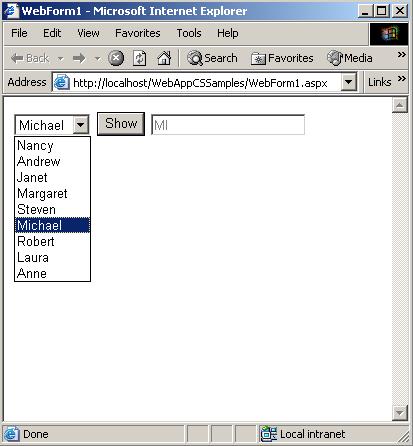
Everybody knows the dropdownbox. You can see it in the image at the left of your screen. It's very easy to create it with Seam:
<h:selectOneMenu value="#{criteria.name}" id="name">
    <s:selectItems var="name"
        value="#{nameManager.getNames()}"
        label="#{messages[nameManager.getKey(name)]}"/>
    <s:convertEnum />
</h:selectOneMenu>
The class NameManager has a method getNames() which returns a a list of enums. The s:convertEnum tag will convert the enum to a text based String. The label attributes is used to translate the name in the correct language (with help of the getKey() method of course, which will return a String).
Now, my problem was that there was a default label (the empty String), and I wanted to be one of the select items to be selected by default.
Easy said, easy done. In your backend, make sure #{criteria.name} is initialized to an enum which holds the default value.
So with this change, one of the select items was selected by default. The problem was: the empty label was STILL there!
After doing some research, I noticed I had to specify the hideNoSelectionLabel : true.
So my code would look like:
<h:selectOneMenu value="#{criteria.name}" id="name">
    <s:selectItems var="name"
        value="#{nameManager.getNames()}"
        label="#{messages[nameManager.getKey(name)]}"
        hideNoSelectionLabel="true"/>
    <s:convertEnum />
</h:selectOneMenu>
... but still, the no selection label was visible :-). The final trick I had to do, was to specify the h:selectOneMenu to required
<h:selectOneMenu value="#{criteria.name}" id="name" required="true">
    <s:selectItems var="name"
        value="#{nameManager.getNames()}"
        label="#{messages[nameManager.getKey(name)]}"
        hideNoSelectionLabel="true"/>
     <s:convertEnum />
</h:selectOneMenu>
Problem solved :-) !
 The problem I described earlier wasn't totally solved after the about:config change (although things went better ...)
Yesterday, I solved the problem but I wanted to be sure the problem didn't come up again :-).
The problem is situated in a broken profiles directory:
<a href="mailto:jochen@baileys">jochen@baileys</a> ~/.mozilla/firefox $ ls -al
total 24
drwx------ 4 jochen jochen 4096 2010-04-29 09:08 .
drwx------ 5 jochen jochen 4096 2010-02-09 15:29 ..
drwx------ 8 jochen jochen 4096 2010-04-29 09:07 56r3yu4x.default
-rw-r--r-- 1 jochen jochen   94 2010-04-29 09:08 profiles.ini
Solution
 Arghhh ... everytime I need this, I always have to Google it. Dunno why, but I'm not able to remember it :-). I want to have a list of files (just the path/name) which contain that keyword
The correct command is:
$ find . | xargs grep '##KEYWORD_YOU_WANT_TO_LOOKUP##' -sl